Need to use multiple AI products on Mac at the same time? This software can help you improve efficiency
Juggling ChatGPT, Claude and other AI web apps on Mac? Slidepad keeps them in a sidebar so you can switch between multiple AI products without losing focus.

- Louis
- 4 min read
- Affiliate Disclosure

I keep ChatGPT and Claude open side by side all day. ChatGPT for drafts and quick lookups, Claude for anything that needs real reasoning. Both live in browser tabs, and browser tabs have a habit of vanishing right when I need them.
Switching means cycling through every window on the Mac. On my machine that is usually five or six, none of them labelled in a way that lets me guess right. Window managers help, but they all assume I already know which window I want before I start hunting for it.
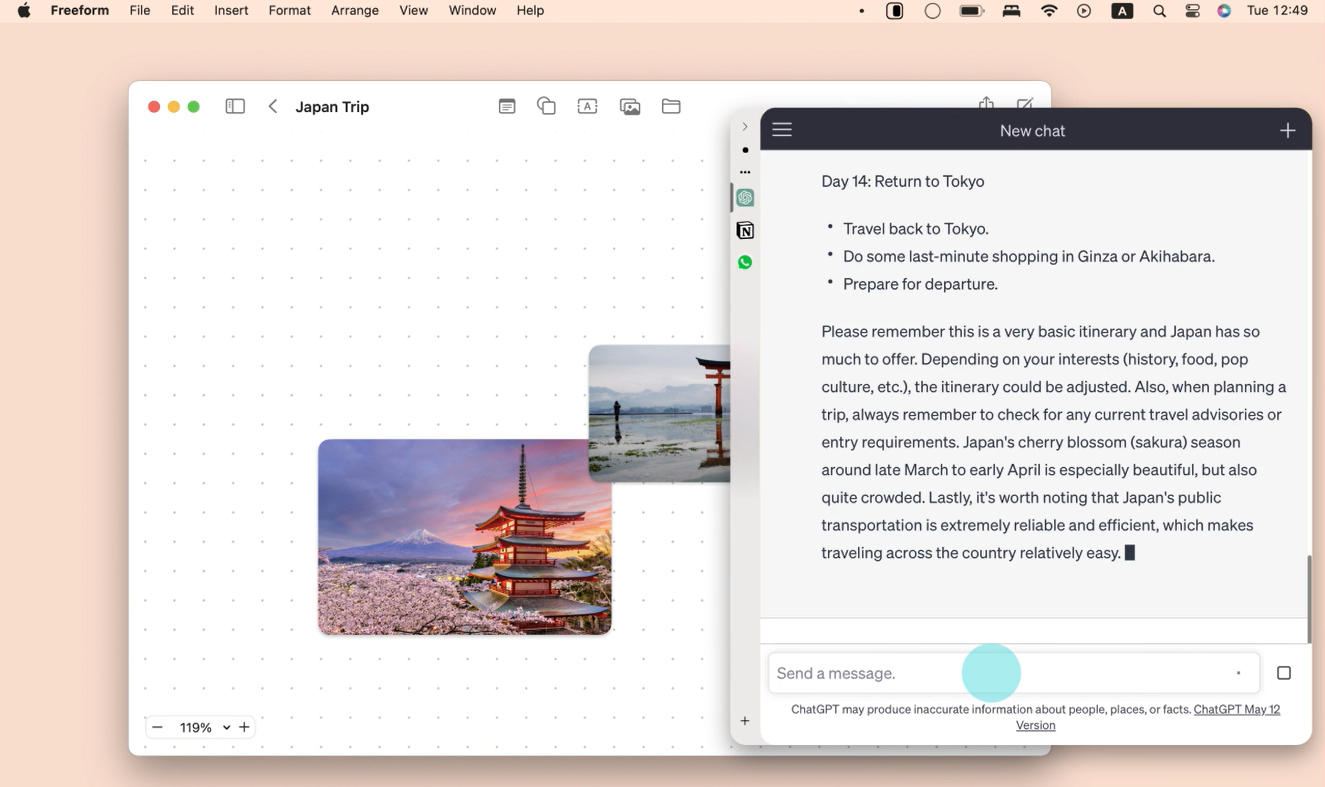
Slidepad takes a different route. It is a small browser window that lives on the edge of the screen. Push the pointer to that edge and it slides in over whatever I am working on. Move away and it slides back out. The windows underneath never move.
How the hot edge behaves
The trigger is a hot corner or a hot edge, and you pick which one. Slide in from the right and it covers the right third of the display. It also takes a global keyboard shortcut, so I can trigger it without moving the pointer at all.
This is the part that matters for AI work. Both ChatGPT and Claude run long conversations with answers worth reading to the end. Alt-tab away and come back, and I have lost my scroll position and half my train of thought. With a slide-over, I nudge the pointer, finish reading, nudge away, keep writing. Nothing behind it reflows.
Pads hold the actual sites. Each pad is a tab, and the omnibox takes a URL or a search keyword, the same as any browser. There is no cap on how many I can add, so my AI setup has room to grow past two products.
What is new in the current version
Slidepad now ships an MCP server, which is the feature that made it stick for me. It connects tools like Codex, Claude and Cursor to pages I can see and control inside the pad. So an agent can look at the AI web app already open in my sidebar instead of me pasting context into a chat box by hand.
Profile switching separates personal, work and client sessions, so I am not logging out of one and into another every time a context changes. Safari web extensions load inside the pad, which means uBlock Origin Lite and Bitwarden come with me rather than staying behind in Safari.
iCloud sync carries pads, profiles, favourites and preferences between Macs. One caveat: logins and browsing data stay on each device. That is the right call for privacy, but it does mean a second Mac needs its own sign-ins.
What it costs
Prices as of October 2026, straight from slidepad.app:
- Lifetime $25, one payment, three Mac seats included.
- Monthly $2, same three seats, cancel any time.
- 30-day free trial before you pay anything.
Checkout runs through Stripe and the licence lands in your email. Three seats covers a personal Mac, a work laptop and a test machine, which is how I use it.
Slidepad is also inside the Setapp subscription, where it starts at $14.99 per month with a seven-day trial. That bundle is worth it if you also want CleanMyMac, Bartender and the rest, and it is poor value for this app alone.
One discrepancy to know about: the Setapp listing still shows version 1.6.2 for macOS 11.4 and later, while the current direct version requires macOS 15 or later. If you are on an older Mac, the Setapp copy may be your only option. Buying direct is the cheaper path if your system qualifies.
Slidepad vs. rearranging your own windows
macOS has no Slide Over, so there is no free equivalent. Safari lets you float a window, but a floating Safari window cannot hold a sidebar of pads, cannot switch profiles, and cannot run an MCP server. That leaves Slidepad against tidier window management, and I tried the tidier-window route first.
Where it falls short
If you work in one AI tool and nothing else, this is overkill. Chrome with a pinned tab does the same job. Slidepad earns its price when you are genuinely bouncing between several web apps all day, which is why it works for me and would not work for someone with a single-tab workflow.
Picture-in-picture, multi-display support and drag and drop are all there, along with developer tools and a mobile or desktop user-agent switch. Treating it as a general slide-over browser rather than an AI-specific tool is fair.
Wrapping up
The trial is 30 days and costs nothing, so the only thing at stake is the habit. Put the AI tabs you actually use into a pad on one Mac, and keep it only if you notice yourself pushing the pointer to the edge instead of reaching for Cmd+Tab.
Download Slidepad from the official site →
If you also need a Mac maintenance app alongside it, CleanMyMac through Setapp is the piece I would pair with this setup.
