
Monitors are ubiquitous in our lives, ranging from giant advertising screens in squares to the laptop you are likely using right now. What are the most common monitor sizes, resolutions, and aspect ratios of the displays we encounter daily, and what common devices correspond to these data?
While we might not pay much attention to these details ordinarily, understanding them can be very helpful when choosing a product. In this article, we will list these data points, allowing you to easily reference and use them.
Common Sizes
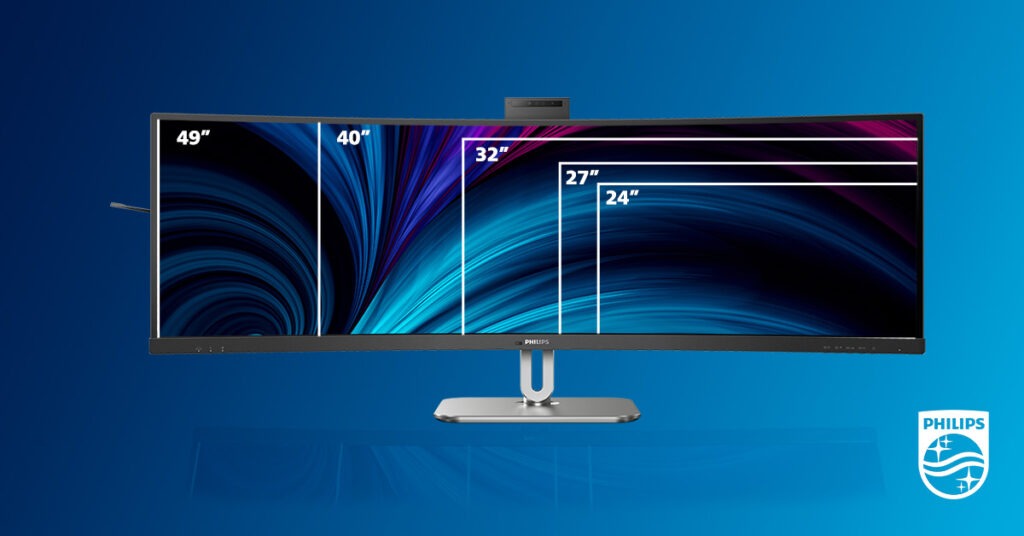
First, we would like to provide information on the dimensions of common display sizes because they are very important, especially when we need to embed a monitor into a wall to enhance the design of our home.
Additionally, when we want to purchase a new PC monitor but have limited desktop space, knowing the exact size specifications can help us avoid disrupting our plans.
| Diagonal Size (inches) | Length (inches) | Width (inches) | Aspect Ratio | Common Devices |
|---|---|---|---|---|
| 13 | 11.26 | 7.09 | 16:10 | Laptop |
| 14 | 12.17 | 7.64 | 16:9 | Laptop |
| 15 | 13.15 | 8.24 | 16:9 | Laptop |
| 16 | 13.60 | 8.50 | 16:9 | Laptop |
| 17 | 14.80 | 9.27 | 16:10 | Laptop |
| 19 | 16.64 | 10.36 | 16:10 | PC monitor |
| 21.5 | 18.78 | 10.55 | 16:9 | PC monitor, TV |
| 22 | 18.74 | 10.54 | 16:9 | PC monitor |
| 24 | 20.92 | 11.77 | 16:9 | PC monitor, TV |
| 27 | 23.54 | 13.24 | 16:9 | PC monitor, TV |
| 32 | 27.90 | 15.69 | 16:9 | PC monitor, TV |
| 40 | 34.86 | 19.61 | 16:9 | TV, large display |
| 43 | 37.52 | 21.10 | 16:9 | TV, large display |
| 50 | 43.58 | 24.52 | 16:9 | TV, large display |
| 55 | 47.87 | 26.91 | 16:9 | TV, large display |
| 65 | 56.65 | 31.87 | 16:9 | TV, large display |
| 75 | 65.37 | 36.77 | 16:9 | TV, large display |
| 85 | 73.98 | 41.61 | 16:9 | TV, large display |
Common Resolutions

Secondly, we would like to provide information on common display resolutions.
What is resolution? The display image consists of individual pixels, and resolution refers to the number of these pixels. For screens of the same size, a higher resolution means a more detailed image and a clearer display. However, higher resolution generally also means a higher price, so it is important to choose based on your own needs.
| Common Name | Resolution (pixels) | Aspect Ratio | Common Devices |
|---|---|---|---|
| HD | 1280 x 720 | 16:9 | Laptop, PC monitor, TV |
| HD+ | 1600 x 900 | 16:9 | Laptop, PC monitor |
| FHD (1080p) | 1920 x 1080 | 16:9 | Laptop, PC monitor, TV, large display |
| WUXGA | 1920 x 1200 | 16:10 | Laptop, PC monitor |
| 2K/QHD | 2560 x 1440 | 16:9 | Laptop, PC monitor, TV |
| WQHD | 3440 x 1440 | 21:9 | PC monitor |
| 4K/UHD (2160p) | 3840 x 2160 | 16:9 | Laptop, PC monitor, TV, large display |
| 4K (Cinema) | 4096 x 2160 | ~17:9 | Large display, cinema |
| 5K | 5120 x 2880 | 16:9 | Laptop, PC monitor |
| 8K (4320p) | 7680 x 4320 | 16:9 | TV, large display |
Common Aspect Ratios
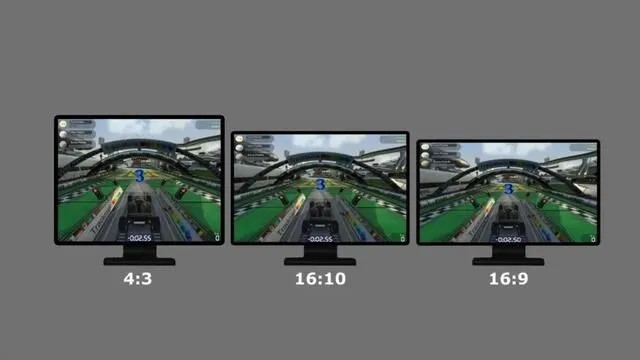
In the two tables above, there is a column labeled ‘Aspect Ratio,’ which represents the ratio of the width to the height of the screen and can be calculated based on size and resolution.
Why are most displays concentrated in a few specific aspect ratios? This is because various devices in our lives have industry standards related to them, or because a certain ratio can display the most information within the smallest dimension, or because certain ratios are more convenient for factory production and manufacturing. Therefore, common displays generally use a few common aspect ratios.
Why is the aspect ratio important? Since common displays are concentrated in a few common ratios, cameras, camcorders, and other devices, as well as the aspect ratios of movies and videos, are also focused on these options. This avoids stretching, distortion, or the appearance of large black borders when we watch them.
The most mainstream aspect ratio currently is 16:9. Some widescreen displays use 21:9 to offer a wider field of view, and there are also monitors that use 16:10 to provide more vertical viewing space. You can choose according to your preference.
Reference for some data: https://en.wikipedia.org/wiki/Display_resolution